
Easy entry with a QR code. >>
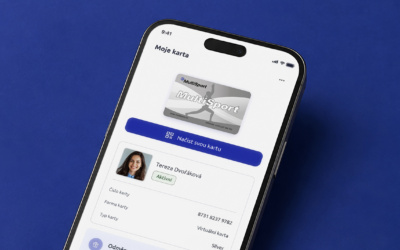
When you arrive, simply open your virtual card and show the QR code to the staff.


With a virtual card on your phone, simply show the QR code in the My MultiSport app when you arrive. You only need to present your ID when your photo is first verified. You can also use your virtual card abroad.
S virtuální kartou v telefonu se při vstupu prokážete QR kódem z aplikace My MultiSport. Doklad totožnosti předložíte jen při prvním ověření fotografie. Vyrazit s ní můžete i do zahraničí.

Easy entry with a QR code. >>
When you arrive, simply open your virtual card and show the QR code to the staff.

Your card, always at hand. >>
It’s stored right on your phone, so you no longer need to carry your plastic card.

ID only needed for initial verification. >>
Once your identity has been verified, you won’t need to show your ID on subsequent visits.

Stay active and unwind in six countries.>>
With your virtual card, you can visit selected partner facilities in Czechia, Slovakia, Poland, Bulgaria, Croatia and Turkey.
You can complete all the steps directly in the My MultiSport app.

Log in to your My MultiSport account. If you don’t have one yet, create one directly in the app.

In the My Card section, select the option to switch to a virtual card. Upload your photo (we do not store it; it is used only within the app), enter your phone number and complete your virtual card setup in the app.

Use the International Activity Map to find a facility that offers identity verification. When you visit, present your virtual card together with your ID. On subsequent visits, you’ll only need the card on your phone.

Use the Activity Map in the My MultiSport app to easily find partner facilities nearby, check the latest entry conditions and choose an activity that suits your mood.
When you arrive, simply open your virtual card in the My MultiSport app and show its QR code to the staff.
Both virtual and plastic cards allow one visit per day in total.

Plastic card
Virtuální karta
Only one version of your card can be active at a time.
Switching to a virtual card deactivates your plastic card.
Your virtual card can only be used on one device.
Every holder of an employee or accompanying MultiSport Card older than 15 years can use the virtual card. It is only necessary to download the My MultiSport mobile application and go through a few simple steps to switch from a plastic card to a virtual one.
There are no additional fees required for switching to a virtual card.
You can only have one active card. Either continue using the plastic card or exchange it for a virtual one using the My MultiSport mobile application. After switching to the virtual card, you won’t need the plastic one anymore. If you would like your plastic card back, please contact us at info@multisport.cz or contact your employer.
If you already have an account on My MultiSport, you don’t need to create a new one for the mobile application. Simply log in with your email address and password.
If you don’t have an account on My MultiSport, click on “Create an account” and follow the steps to complete the registration.
When trying to create an account in the mobile application, I see a message saying that I already have an account, but I don’t remember creating one. What should I do?
This means that your card or email address is already registered on My MultiSport. If you don’t remember your password, click on “Reset password” on the main screen to receive an email with a link to reset your password.
To use the virtual card, you need to have your own account on My MultiSport and be logged into it. Only then can you configure your virtual card. However, even without creating an account, you can still find sports facilities offered by the MultiSport Card in the My MultiSport mobile application.
Please follow the steps in your My MultiSport mobile application. After logging into your My MultiSport account, you will need to provide your photo and your phone number.
The photo must be well-focused, and your face must be easily recognizable. You can choose your photo from the library or take a picture with your phone.
To fully use your virtual card, you need to upload a photo that will serve as a sufficient identification for future visits after confirmation during the first visit to a sports facility. Therefore, you won’t need to bring your ID next time.
Yes, you can change your photo using the My MultiSport mobile application. Remember that the number of opportunities to change the photo is limited. If you have any problems changing the photo, please contact us.
We do not store your photos anywhere. They will remain only on your device, associated with your virtual card and will be used only for the purpose of verifying your identity when visiting the sports facility.
Since the MultiSport Card is your personal card, which must not be used by anyone else, the phone number serves as an additional verification that the card will only be used by your device.
Your phone number serves as additional verification of your virtual card. We may also need to call you or send you text messages to provide you with important information regarding the MultiSport services. If you have checked the box to agree to marketing communications when setting up the virtual card, we will also provide you with updates from the world of MultiSport.
For each employer, this period varies. Therefore, after completing the configuration process, you will receive a message in the app with the exact date from which you can start using your virtual card.
Example 1) If you have an active card, your virtual card will be active immediately after switching.
Example 2) If you have a card that is not yet active but will be active from the 1st day of the following month, you can switch to a virtual card. However, it will only be active from the 1st day of the following month, just like the plastic card would be. You will see in the app from when the card will be active.
Remember that by switching to a virtual card, the plastic card ceases to be valid.
You can use your virtual card on a single device, but other features of My MultiSport app (list of sports facilities, map) can be used on any number of devices.
To change the device you use for your virtual card, download the mobile app on the new device and log in with your account. You will be prompted to confirm the device change and the virtual card on your old device will stop working. The number of device changes is limited. If you encounter any issues, contact the hotline.
If your MultiSport Card is inactive, you won’t be able to use it for entries to sports facilities, but the app will retain your data. You won’t have to re-enter your information or reconfigure your virtual card when you decide to activate your MultiSport Card again.
Simply download the mobile app onto a new device and set up your virtual card using a few simple steps. Once you complete this process, you’ll be able to use your virtual card on the new device and the old card will no longer work. If you need assistance, you can contact us.
When visiting a sports facility for the first time with a virtual card, go to the “My card” folder in the mobile app and click on “Verify photo”. Show your photo at the facility’s reception along with your ID. The facility’s staff will compare the photo in the app with the photo on your ID and confirm your identity. In your app, you will see that your photo has been verified. This allows you to simply show your photo and name in the app without the need to show your ID for future visits to the sports facilities.
Simply open the My MultiSport mobile app, go to the “My card” folder in the bottom menu, and click on “Scan card”. A QR code will appear. Show this QR code to the facility’s staff at the reception to scan it and record your visit.
Make sure that your card is active and that your device is connected to the internet. If you meet both requirements and the QR code still can’t be scanned, contact us at +420 220 188 700. After verifying your card over the phone with the MultiSport hotline, the sports facility can record your visit on a paper form.
If the sports facility doesn’t have a QR code scanner or it’s not possible to use the QR code scanner, find your “Offline code” located below the QR code on your virtual card and provide this number to the facility’s staff. This will grant you access.